
es elasticsearch如何支持 热加载-通过修改ik分词器源码实现热加载自定义词典吗?
2 个回答
 今朝有酒今朝醉,明日愁来明日愁。念远怀人逻辑:自定义词典的数据从mysql加载,只需要重启一次ES即可,后续热加载 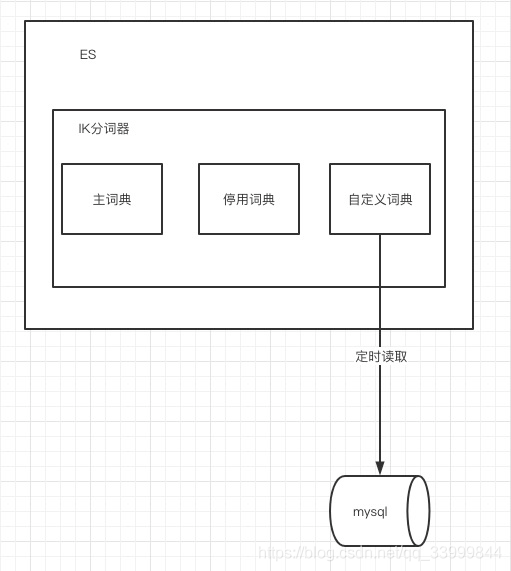 实现:在自定义词典的init方法中实现每隔一定时间读取mysql并写入自定义词典的逻辑发布于 2022-03-22 18:25 •IP属地 山东举报评论收藏
今朝有酒今朝醉,明日愁来明日愁。念远怀人逻辑:自定义词典的数据从mysql加载,只需要重启一次ES即可,后续热加载  实现:在自定义词典的init方法中实现每隔一定时间读取mysql并写入自定义词典的逻辑发布于 2022-03-22 18:25 •IP属地 山东举报评论收藏 垆边人似月,皓腕凝霜雪。董克平笔记IK 分词器是一款非常优秀的开源中文分词。也可以配置自定义词库: ```xml <properties> <comment>IK Analyzer 扩展配置</comment> <!--用户可以在这里配置自己的扩展字典 --> <entry key="ext_dict">custom/mydict.dic;custom/single_word_low_freq.dic</entry> <!--用户可以在这里配置自己的扩展停止词字典--> <entry key="ext_stopwords">custom/ext_stopword.dic</entry> <!--用户可以在这里配置远程扩展字典 --> <entry key="remote_ext_dict">location</entry> <!--用户可以在这里配置远程扩展停止词字典--> <entry key="remote_ext_stopwords">http://xxx.com/xxx.dic</entry> </properties> ``` 但是有个问题是默认当词库需要更新时要重启 ES 才能生效,这个在线上肯定是不可接受的。 IK 分词器官方也提供了一种远程热更新词库的方式: 目前该插件支持热更新 IK 分词,通过上文在 IK 配置文件中提到的如下配置 ```xml <!--用户可以在这里配置远程扩展字典 --> <entry key="remote_ext_dict">location</entry> <!--用户可以在这里配置远程扩展停止词字典--> <entry key="remote_ext_stopwords">location</entry> ``` 其中 location 是指一个 url,比如 http://yoursite.com/getCustomDict,该请求只需满足以下两点即可完成分词热更新。 该 http 请求需要返回两个头部(header),一个是 Last-Modified,一个是 ETag,这两者都是字符串类型,只要有一个发生变化,该插件就会去抓取新的分词进而更新词库。 该 http 请求返回的内容格式是一行一个分词,换行符用 \n 即可。 满足上面两点要求就可以实现热更新分词了,不需要重启 ES 实例。 可以将需自动更新的热词放在一个 UTF-8 编码的 .txt 文件里,放在 nginx 或其他简易 http server 下,当 .txt 文件修改时,http server 会在客户端请求该文件时自动返回相应的 Last-Modified 和 ETag。可以另外做一个工具来从业务系统提取相关词汇,并更新这个 .txt 文件。 这个方案有时候不太适合项目中的要求。有时候我们更希望那种简单点的,比如我们把要添加、删除的词存入数据库,然后 IK 分词器隔一段时间自己去更新。 那么现在的问题就变成: 怎么加载数据库中的词语到 IK 的词库中? 词语是全量同步还是增量同步? ### 分析 先看 IK 分词器的配置: ```xml <properties> <comment>IK Analyzer 扩展配置</comment> <!--用户可以在这里配置自己的扩展字典 --> <entry key="ext_dict">custom/mydict.dic;custom/single_word_low_freq.dic</entry> <!--用户可以在这里配置自己的扩展停止词字典--> <entry key="ext_stopwords">custom/ext_stopword.dic</entry> <!--用户可以在这里配置远程扩展字典 --> <entry key="remote_ext_dict">location</entry> <!--用户可以在这里配置远程扩展停止词字典--> <entry key="remote_ext_stopwords">http://xxx.com/xxx.dic</entry> </properties> ``` 因为官方已经提供了通过远程自动更新,可以照葫芦画瓢,先看看官方源码是怎么实现远程更新字典的。 org.wltea.analyzer.dic.Dictionary#initial 方法: ```java public static synchronized void initial(Configuration cfg) { if (singleton == null) { synchronized (Dictionary.class) { if (singleton == null) { singleton = new Dictionary(cfg); singleton.loadMainDict(); singleton.loadSurnameDict(); singleton.loadQuantifierDict(); singleton.loadSuffixDict(); singleton.loadPrepDict(); singleton.loadStopWordDict(); if(cfg.isEnableRemoteDict()){ // 建立监控线程 for (String location : singleton.getRemoteExtDictionarys()) { // 10 秒是初始延迟可以修改的 60是间隔时间 单位秒 pool.scheduleAtFixedRate(new Monitor(location), 10, 60, TimeUnit.SECONDS); } for (String location : singleton.getRemoteExtStopWordDictionarys()) { pool.scheduleAtFixedRate(new Monitor(location), 10, 60, TimeUnit.SECONDS); } } } } } } ``` 可以发现默认是 10s 延迟后每 60s 从远程加载字典。 再看 org.wltea.analyzer.dic.Monitor#run 方法: ```java public void run() { SpecialPermission.check(); AccessController.doPrivileged((PrivilegedAction<Void>) () -> { this.runUnprivileged(); return null; }); } ``` 再看 org.wltea.analyzer.dic.Monitor#runUnprivileged 方法: ```java /** * 监控流程: * ①向词库服务器发送Head请求 * ②从响应中获取Last-Modify、ETags字段值,判断是否变化 * ③如果未变化,休眠1min,返回第①步 * ④如果有变化,重新加载词典 * ⑤休眠1min,返回第①步 */ public void runUnprivileged() { //超时设置 RequestConfig rc = RequestConfig.custom().setConnectionRequestTimeout(10*1000) .setConnectTimeout(10*1000).setSocketTimeout(15*1000).build(); HttpHead head = new HttpHead(location); head.setConfig(rc); //设置请求头 if (last_modified != null) { head.setHeader("If-Modified-Since", last_modified); } if (eTags != null) { head.setHeader("If-None-Match", eTags); } CloseableHttpResponse response = null; try { response = httpclient.execute(head); //返回200 才做操作 if(response.getStatusLine().getStatusCode()==200){ if (((response.getLastHeader("Last-Modified")!=null) && !response.getLastHeader("Last-Modified").getValue().equalsIgnoreCase(last_modified)) ||((response.getLastHeader("ETag")!=null) && !response.getLastHeader("ETag").getValue().equalsIgnoreCase(eTags))) { // 远程词库有更新,需要重新加载词典,并修改last_modified,eTags Dictionary.getSingleton().reLoadMainDict(); last_modified = response.getLastHeader("Last-Modified")==null?null:response.getLastHeader("Last-Modified").getValue(); eTags = response.getLastHeader("ETag")==null?null:response.getLastHeader("ETag").getValue(); } }else if (response.getStatusLine().getStatusCode()==304) { //没有修改,不做操作 //noop }else{ logger.info("remote_ext_dict {} return bad code {}" , location , response.getStatusLine().getStatusCode() ); } } catch (Exception e) { logger.error("remote_ext_dict {} error!",e , location); }finally{ try { if (response != null) { response.close(); } } catch (IOException e) { logger.error(e.getMessage(), e); } } } ``` 其实可以看出 IK 内部通过请求远程的 remote_ext_dict 和remote_ext_stopwords,将响应参数与 Monitor 内部的 last_modified 或 eTags 进行比较,从而判断字典是否需要更新,当字典需要更新的话就会调用 org.wltea.analyzer.dic.Dictionary#reLoadMainDict 方法重新加载字典: ```java void reLoadMainDict() { logger.info("重新加载词典..."); // 新开一个实例加载词典,减少加载过程对当前词典使用的影响 Dictionary tmpDict = new Dictionary(configuration); tmpDict.configuration = getSingleton().configuration; tmpDict.loadMainDict(); tmpDict.loadStopWordDict(); _MainDict = tmpDict._MainDict; _StopWords = tmpDict._StopWords; logger.info("重新加载词典完毕..."); } ``` 可以发现停用词和扩展词就是重新 load 了一下,那么是从哪里 load 的呢,看看 org.wltea.analyzer.dic.Dictionary#loadStopWordDict 方法: ```java /** * 加载用户扩展的停止词词典 */ private void loadStopWordDict() { // 建立主词典实例 _StopWords = new DictSegment((char) 0); // 读取主词典文件 Path file = PathUtils.get(getDictRoot(), Dictionary.PATH_DIC_STOP); loadDictFile(_StopWords, file, false, "Main Stopwords"); // 加载扩展停止词典 List<String> extStopWordDictFiles = getExtStopWordDictionarys(); if (extStopWordDictFiles != null) { for (String extStopWordDictName : extStopWordDictFiles) { logger.info("[Dict Loading] " + extStopWordDictName); // 读取扩展词典文件 file = PathUtils.get(extStopWordDictName); loadDictFile(_StopWords, file, false, "Extra Stopwords"); } } // 加载远程停用词典 List<String> remoteExtStopWordDictFiles = getRemoteExtStopWordDictionarys(); for (String location : remoteExtStopWordDictFiles) { logger.info("[Dict Loading] " + location); List<String> lists = getRemoteWords(location); // 如果找不到扩展的字典,则忽略 if (lists == null) { logger.error("[Dict Loading] " + location + "加载失败"); continue; } for (String theWord : lists) { if (theWord != null && !"".equals(theWord.trim())) { // 加载远程词典数据到主内存中 logger.info(theWord); _StopWords.fillSegment(theWord.trim().toLowerCase().toCharArray()); } } } ``` 可以看到加载是分两种,一个是加载配置的本地停用词典,另一个是加载的远程停用词典。这里也能看出 remote_ext_stopwords 有两个作用:判断是否有字典更新和获取更新的字典数据,比如我们想搭建一个 HTTP 服务去处理词语更新的话,就需要一个 URL 提供两种不同的访问方式,最好的方式其实是提供一个远程文件地址,如http://192.120.180.100:8080/hot_ext.dic,然后其他的字典更新服务更新这个文件。 目前比较流行的方式是轮训从数据库中获取最新的字典。 ### 基于 MySQL 更新字典的实现 在这之前先要考虑上面提出的问题:是全量更新还是增量更新。字典本身数据量并不大,充其量也就小几十万,一般也不会把所有的词语都放在词库中,而且数据库中的字典数据是为整个 ES 集群服务的,增量的话考虑的细节就会很多,同时在进行字典更新的时候是不会影响先有字典的使用的,综合来看全量更新更好。 接下来实现基于 MySQL 热更新字典。 先建立两张表: ```java CREATE TABLE stop_words ( word VARCHAR ( 200 ) ); CREATE TABLE ext_words ( word VARCHAR ( 200 ) ); ``` 其中 stop_words 是停用词表,ext_words 是扩展词表。 添加 MySQL 依赖: ```xml <dependency> <groupId>mysql</groupId> <artifactId>mysql-connector-java</artifactId> <version>5.1.48</version> </dependency> ``` 这里要注意的是,根据 Maven 的规则,需要在 src\main\assemblies\plugin.xml 中添加配置使得数据库相关依赖一并打包: ```xml <dependencySet> <outputDirectory/> <useProjectArtifact>true</useProjectArtifact> <useTransitiveFiltering>true</useTransitiveFiltering> <includes> <include>mysql:mysql-connector-java</include> </includes> </dependencySet> ``` 既然使用了 MySQL,那肯定要有数据相关的配置,那这个配置文件放在哪呢。其实在 IK 的源码中可以看到 PathUtils 这个类,已经有现成的方法获取 IK 配置文件夹下的配置文件了,所以这里的 mysql.properties 文件就放在跟 IKAnalyzer.cfg.xml 同级的文件夹下。 ```xml mysql.url=jdbc:mysql://10.224.221.111:3306/test mysql.user=root mysql.password=root ``` 接下来开始编写热更新字典的代码。再理一下思路,我们要实现的就是开一个线程每隔一段时间从 MySQL 中捞出数据,直接更新本地字典,且加载过程几乎不会对当前词典的使用产生影响。 还有一个问题是从 MySQL 热加载的代码写在哪。其实 IK 原生的从远程加载自定义词库就在 org.wltea.analyzer.dic.Dictionary#loadMainDict 方法中: ``` /** * 加载主词典及扩展词典 */ private void loadMainDict() { // 建立一个主词典实例 _MainDict = new DictSegment((char) 0); // 读取主词典文件 Path file = PathUtils.get(getDictRoot(), Dictionary.PATH_DIC_MAIN); loadDictFile(_MainDict, file, false, "Main Dict"); // 加载扩展词典 this.loadExtDict(); // 加载远程自定义词库 this.loadRemoteExtDict(); } ``` 完全可以照葫芦画瓢,把从 MySQL 加载的代码也写在这里,好处是可以复用 org.wltea.analyzer.dic.Dictionary#reLoadMainDict 方法。但是要注意的是 org.wltea.analyzer.dic.Dictionary#reLoadMainDict 方法也会调用 org.wltea.analyzer.dic.Dictionary#loadMainDict 方法。也就是说如果我们将 MySQL 热加载的代码写在这个地方,那此时就不要再同时使用 IK 原生的远程热加载方式了。 这里为了保留 IK 原生的远程热加载方式,就将代码写在 org.wltea.analyzer.dic.Dictionary#initial 处。 接下来开始代码实现: ```java /** * 词典初始化 由于IK Analyzer的词典采用Dictionary类的静态方法进行词典初始化 * 只有当Dictionary类被实际调用时,才会开始载入词典, 这将延长首次分词操作的时间 该方法提供了一个在应用加载阶段就初始化字典的手段 * * @return Dictionary */ public static synchronized void initial(Configuration cfg) { if (singleton == null) { synchronized (Dictionary.class) { if (singleton == null) { singleton = new Dictionary(cfg); singleton.loadMainDict(); singleton.loadSurnameDict(); singleton.loadQuantifierDict(); singleton.loadSuffixDict(); singleton.loadPrepDict(); singleton.loadStopWordDict(); if(cfg.isEnableRemoteDict()){ // 建立监控线程 for (String location : singleton.getRemoteExtDictionarys()) { // 10 秒是初始延迟可以修改的 60是间隔时间 单位秒 pool.scheduleAtFixedRate(new Monitor(location), 10, 60, TimeUnit.SECONDS); } for (String location : singleton.getRemoteExtStopWordDictionarys()) { pool.scheduleAtFixedRate(new Monitor(location), 10, 60, TimeUnit.SECONDS); } } new Thread(()->{ Properties pro = new Properties(); try { pro.load(new FileInputStream(PathUtils.get(singleton.getDictRoot(), "mysql.properties").toFile())); } catch (IOException e) { e.printStackTrace(); } while (true){ try { TimeUnit.SECONDS.sleep(5); logger.info("开始从MySQL加载....."); try (Connection conn = DriverManager.getConnection(pro.getProperty("mysql.url"), pro.getProperty("mysql.user"), pro.getProperty("mysql.password"))) { reLoadFromMySQL(conn, pro); } logger.info("从MySQL加载完成....."); }catch (Exception e){ logger.error("load from mysql error..",e); } } }).start(); } } } } static { try { Class.forName("com.mysql.jdbc.Driver"); } catch (ClassNotFoundException ignored) { } } private static void reLoadFromMySQL(Connection conn, Properties pro) throws Exception { logger.info("从MySQL重新加载词典...start"); // 新开一个实例加载词典,减少加载过程对当前词典使用的影响 Dictionary tmpDict = new Dictionary(getSingleton().configuration); tmpDict.configuration = getSingleton().configuration; tmpDict.loadMainDict(); tmpDict.reloadExtDictFromMySQL(conn); tmpDict.loadStopWordDict(); tmpDict.reloadStopDictFromMySQL(conn); getSingleton()._MainDict = tmpDict._MainDict; getSingleton()._StopWords = tmpDict._StopWords; logger.info("从MySQL重新加载词典完毕...end"); } private void reloadStopDictFromMySQL(Connection conn) throws SQLException { try (Statement statement = conn.createStatement();ResultSet rs = statement.executeQuery("select word from stop_words")) { while(rs.next()) { String word = rs.getString("word"); if (word != null && !word.isBlank()){ _StopWords.fillSegment(word.toCharArray()); } } } } private void reloadExtDictFromMySQL(Connection conn) throws SQLException { try (Statement statement = conn.createStatement();ResultSet rs = statement.executeQuery("select word from ext_words")) { while(rs.next()) { String word = rs.getString("word"); if (word != null && !word.isBlank()){ _MainDict.fillSegment(word.toCharArray()); } } } } ``` 接下来打包: ``` ➜ elasticsearch-analysis-ik git:(6.x-hot) ✗ mvn clean package -Dmaven.test.skip=true ``` 将打包好的 elasticsearch-analysis-ik-6.5.0.zip 解压后放在 ES 的 plugins/ik 目录中: 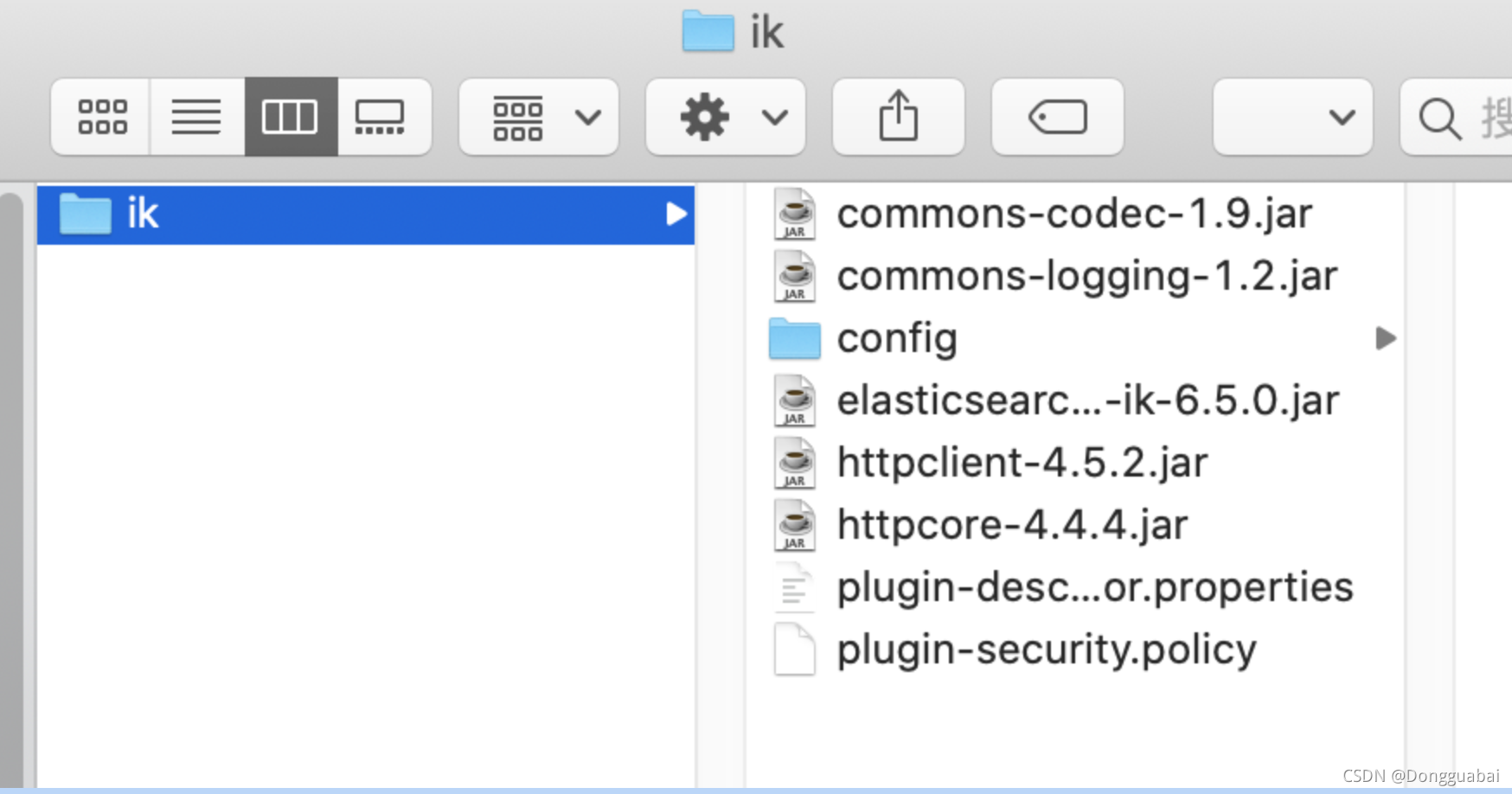 重新启动 ES。 会出现如下异常: ```java java.lang.ExceptionInInitializerError: null at java.lang.Class.forName0(Native Method) ~[?:1.8.0_202] at java.lang.Class.forName(Class.java:264) ~[?:1.8.0_202] at com.mysql.jdbc.NonRegisteringDriver.<clinit>(NonRegisteringDriver.java:98) ~[?:?] at java.lang.Class.forName0(Native Method) ~[?:1.8.0_202] at java.lang.Class.forName(Class.java:264) ~[?:1.8.0_202] at org.wltea.analyzer.dic.Dictionary.<clinit>(Dictionary.java:201) ~[?:?] at org.wltea.analyzer.cfg.Configuration.<init>(Configuration.java:40) ~[?:?] at org.elasticsearch.index.analysis.IkTokenizerFactory.<init>(IkTokenizerFactory.java:15) ~[?:?] at org.elasticsearch.index.analysis.IkTokenizerFactory.getIkSmartTokenizerFactory(IkTokenizerFactory.java:23) ~[?:?] at org.elasticsearch.index.analysis.AnalysisRegistry.buildMapping(AnalysisRegistry.java:374) ~[elasticsearch-6.6.2.jar:6.6.2] at org.elasticsearch.index.analysis.AnalysisRegistry.buildTokenizerFactories(AnalysisRegistry.java:184) ~[elasticsearch-6.6.2.jar:6.6.2] at org.elasticsearch.index.analysis.AnalysisRegistry.build(AnalysisRegistry.java:158) ~[elasticsearch-6.6.2.jar:6.6.2] at org.elasticsearch.index.IndexService.<init>(IndexService.java:164) ~[elasticsearch-6.6.2.jar:6.6.2] at org.elasticsearch.index.IndexModule.newIndexService(IndexModule.java:397) ~[elasticsearch-6.6.2.jar:6.6.2] at org.elasticsearch.indices.IndicesService.createIndexService(IndicesService.java:519) ~[elasticsearch-6.6.2.jar:6.6.2] at org.elasticsearch.indices.IndicesService.verifyIndexMetadata(IndicesService.java:592) ~[elasticsearch-6.6.2.jar:6.6.2] at org.elasticsearch.gateway.Gateway.performStateRecovery(Gateway.java:129) ~[elasticsearch-6.6.2.jar:6.6.2] at org.elasticsearch.gateway.GatewayService$1.doRun(GatewayService.java:228) ~[elasticsearch-6.6.2.jar:6.6.2] at org.elasticsearch.common.util.concurrent.ThreadContext$ContextPreservingAbstractRunnable.doRun(ThreadContext.java:759) ~[elasticsearch-6.6.2.jar:6.6.2] at org.elasticsearch.common.util.concurrent.AbstractRunnable.run(AbstractRunnable.java:37) ~[elasticsearch-6.6.2.jar:6.6.2] at java.util.concurrent.ThreadPoolExecutor.runWorker(ThreadPoolExecutor.java:1149) ~[?:1.8.0_202] at java.util.concurrent.ThreadPoolExecutor$Worker.run(ThreadPoolExecutor.java:624) ~[?:1.8.0_202] at java.lang.Thread.run(Thread.java:748) [?:1.8.0_202] Caused by: java.security.AccessControlException: access denied ("java.lang.RuntimePermission" "setContextClassLoader") at java.security.AccessControlContext.checkPermission(AccessControlContext.java:472) ~[?:1.8.0_202] at java.security.AccessController.checkPermission(AccessController.java:884) ~[?:1.8.0_202] at java.lang.SecurityManager.checkPermission(SecurityManager.java:549) ~[?:1.8.0_202] at java.lang.Thread.setContextClassLoader(Thread.java:1474) ~[?:1.8.0_202] at com.mysql.jdbc.AbandonedConnectionCleanupThread$1.newThread(AbandonedConnectionCleanupThread.java:66) ~[?:?] at java.util.concurrent.ThreadPoolExecutor$Worker.<init>(ThreadPoolExecutor.java:619) ~[?:1.8.0_202] at java.util.concurrent.ThreadPoolExecutor.addWorker(ThreadPoolExecutor.java:932) ~[?:1.8.0_202] at java.util.concurrent.ThreadPoolExecutor.execute(ThreadPoolExecutor.java:1367) ~[?:1.8.0_202] at java.util.concurrent.Executors$DelegatedExecutorService.execute(Executors.java:668) ~[?:1.8.0_202] at com.mysql.jdbc.AbandonedConnectionCleanupThread.<clinit>(AbandonedConnectionCleanupThread.java:70) ~[?:?] ``` 在网上找的解决方案是在 IK 的 config 中创建文件 socketPolicy.policy,内容为: ```java grant { permission java.net.SocketPermission "*:*","accept,connect,resolve"; permission java.lang.RuntimePermission "setContextClassLoader"; }; ``` 同时在 ES 中的 config 目录文件 jvm.option 添加如下代码配置上面的文件路径: ```java -Djava.security.policy=/Users/dongguabai/develope/elasticsearch/es/elasticsearch-6.6.2/plugins/ik/config/socketPolicy.policy ``` 在使用原生的 IK 分词器的分词效果如下: ```java GET /ik_index3/_analyze { "text": "携手打造的小清新风格的东湖樱花邮局", "analyzer": "ik_max_word" } ``` ```java { "tokens" : [ { "token" : "携手", "start_offset" : 0, "end_offset" : 2, "type" : "CN_WORD", "position" : 0 }, { "token" : "打造", "start_offset" : 2, "end_offset" : 4, "type" : "CN_WORD", "position" : 1 }, { "token" : "的", "start_offset" : 4, "end_offset" : 5, "type" : "CN_CHAR", "position" : 2 }, { "token" : "小", "start_offset" : 5, "end_offset" : 6, "type" : "CN_CHAR", "position" : 3 }, { "token" : "清新", "start_offset" : 6, "end_offset" : 8, "type" : "CN_WORD", "position" : 4 }, { "token" : "清", "start_offset" : 6, "end_offset" : 7, "type" : "CN_CHAR", "position" : 5 }, { "token" : "新风格", "start_offset" : 7, "end_offset" : 10, "type" : "CN_WORD", "position" : 6 }, { "token" : "新风", "start_offset" : 7, "end_offset" : 9, "type" : "CN_WORD", "position" : 7 }, { "token" : "风格", "start_offset" : 8, "end_offset" : 10, "type" : "CN_WORD", "position" : 8 }, { "token" : "的", "start_offset" : 10, "end_offset" : 11, "type" : "CN_CHAR", "position" : 9 }, { "token" : "东湖", "start_offset" : 11, "end_offset" : 13, "type" : "CN_WORD", "position" : 10 }, { "token" : "樱花", "start_offset" : 13, "end_offset" : 15, "type" : "CN_WORD", "position" : 11 }, { "token" : "邮局", "start_offset" : 15, "end_offset" : 17, "type" : "CN_WORD", "position" : 12 } ] } ``` 可以看到“的”也算一个词,同时“小清新”没有算作一个词。 接下来分别往停用词表 stop_words 和扩展词表 ext_words 中插入一条数据: ```sql INSERT into stop_words (word) VALUES ('的'); INSERT into ext_words (word) VALUES ('小清新'); ``` 再来看分词效果: ```java { "tokens" : [ { "token" : "携手", "start_offset" : 0, "end_offset" : 2, "type" : "CN_WORD", "position" : 0 }, { "token" : "打造", "start_offset" : 2, "end_offset" : 4, "type" : "CN_WORD", "position" : 1 }, { "token" : "小清新", "start_offset" : 5, "end_offset" : 8, "type" : "CN_WORD", "position" : 2 }, { "token" : "小", "start_offset" : 5, "end_offset" : 6, "type" : "CN_CHAR", "position" : 3 }, { "token" : "清新", "start_offset" : 6, "end_offset" : 8, "type" : "CN_WORD", "position" : 4 }, { "token" : "新风格", "start_offset" : 7, "end_offset" : 10, "type" : "CN_WORD", "position" : 5 }, { "token" : "新风", "start_offset" : 7, "end_offset" : 9, "type" : "CN_WORD", "position" : 6 }, { "token" : "风格", "start_offset" : 8, "end_offset" : 10, "type" : "CN_WORD", "position" : 7 }, { "token" : "东湖", "start_offset" : 11, "end_offset" : 13, "type" : "CN_WORD", "position" : 8 }, { "token" : "樱花", "start_offset" : 13, "end_offset" : 15, "type" : "CN_WORD", "position" : 9 }, { "token" : "邮局", "start_offset" : 15, "end_offset" : 17, "type" : "CN_WORD", "position" : 10 } ] } ``` 发现已经没有“的”,且多了一个“小清新”。 接下来如果我将“小清新”从扩展词表中删除: ```sql delete from ext_words; ``` 再看分词效果: ```java { "tokens" : [ { "token" : "携手", "start_offset" : 0, "end_offset" : 2, "type" : "CN_WORD", "position" : 0 }, { "token" : "打造", "start_offset" : 2, "end_offset" : 4, "type" : "CN_WORD", "position" : 1 }, { "token" : "小", "start_offset" : 5, "end_offset" : 6, "type" : "CN_CHAR", "position" : 2 }, { "token" : "清新", "start_offset" : 6, "end_offset" : 8, "type" : "CN_WORD", "position" : 3 }, { "token" : "清", "start_offset" : 6, "end_offset" : 7, "type" : "CN_CHAR", "position" : 4 }, { "token" : "新风格", "start_offset" : 7, "end_offset" : 10, "type" : "CN_WORD", "position" : 5 }, { "token" : "新风", "start_offset" : 7, "end_offset" : 9, "type" : "CN_WORD", "position" : 6 }, { "token" : "风格", "start_offset" : 8, "end_offset" : 10, "type" : "CN_WORD", "position" : 7 }, { "token" : "东湖", "start_offset" : 11, "end_offset" : 13, "type" : "CN_WORD", "position" : 8 }, { "token" : "樱花", "start_offset" : 13, "end_offset" : 15, "type" : "CN_WORD", "position" : 9 }, { "token" : "邮局", "start_offset" : 15, "end_offset" : 17, "type" : "CN_WORD", "position" : 10 } ] } ``` 可以发现“小清新”已经不见了,这也就实现了字典的热加载功能。 ### References https://github.com/medcl/elasticsearch-analysis-ik https://blog.csdn.net/qq_40592041/article/details/107856588 https://blog.yourtion.com/java-access-denied-socketpermission-solution.html发布于 2022-03-22 05:39 •IP属地 福建举报评论收藏
垆边人似月,皓腕凝霜雪。董克平笔记IK 分词器是一款非常优秀的开源中文分词。也可以配置自定义词库: ```xml <properties> <comment>IK Analyzer 扩展配置</comment> <!--用户可以在这里配置自己的扩展字典 --> <entry key="ext_dict">custom/mydict.dic;custom/single_word_low_freq.dic</entry> <!--用户可以在这里配置自己的扩展停止词字典--> <entry key="ext_stopwords">custom/ext_stopword.dic</entry> <!--用户可以在这里配置远程扩展字典 --> <entry key="remote_ext_dict">location</entry> <!--用户可以在这里配置远程扩展停止词字典--> <entry key="remote_ext_stopwords">http://xxx.com/xxx.dic</entry> </properties> ``` 但是有个问题是默认当词库需要更新时要重启 ES 才能生效,这个在线上肯定是不可接受的。 IK 分词器官方也提供了一种远程热更新词库的方式: 目前该插件支持热更新 IK 分词,通过上文在 IK 配置文件中提到的如下配置 ```xml <!--用户可以在这里配置远程扩展字典 --> <entry key="remote_ext_dict">location</entry> <!--用户可以在这里配置远程扩展停止词字典--> <entry key="remote_ext_stopwords">location</entry> ``` 其中 location 是指一个 url,比如 http://yoursite.com/getCustomDict,该请求只需满足以下两点即可完成分词热更新。 该 http 请求需要返回两个头部(header),一个是 Last-Modified,一个是 ETag,这两者都是字符串类型,只要有一个发生变化,该插件就会去抓取新的分词进而更新词库。 该 http 请求返回的内容格式是一行一个分词,换行符用 \n 即可。 满足上面两点要求就可以实现热更新分词了,不需要重启 ES 实例。 可以将需自动更新的热词放在一个 UTF-8 编码的 .txt 文件里,放在 nginx 或其他简易 http server 下,当 .txt 文件修改时,http server 会在客户端请求该文件时自动返回相应的 Last-Modified 和 ETag。可以另外做一个工具来从业务系统提取相关词汇,并更新这个 .txt 文件。 这个方案有时候不太适合项目中的要求。有时候我们更希望那种简单点的,比如我们把要添加、删除的词存入数据库,然后 IK 分词器隔一段时间自己去更新。 那么现在的问题就变成: 怎么加载数据库中的词语到 IK 的词库中? 词语是全量同步还是增量同步? ### 分析 先看 IK 分词器的配置: ```xml <properties> <comment>IK Analyzer 扩展配置</comment> <!--用户可以在这里配置自己的扩展字典 --> <entry key="ext_dict">custom/mydict.dic;custom/single_word_low_freq.dic</entry> <!--用户可以在这里配置自己的扩展停止词字典--> <entry key="ext_stopwords">custom/ext_stopword.dic</entry> <!--用户可以在这里配置远程扩展字典 --> <entry key="remote_ext_dict">location</entry> <!--用户可以在这里配置远程扩展停止词字典--> <entry key="remote_ext_stopwords">http://xxx.com/xxx.dic</entry> </properties> ``` 因为官方已经提供了通过远程自动更新,可以照葫芦画瓢,先看看官方源码是怎么实现远程更新字典的。 org.wltea.analyzer.dic.Dictionary#initial 方法: ```java public static synchronized void initial(Configuration cfg) { if (singleton == null) { synchronized (Dictionary.class) { if (singleton == null) { singleton = new Dictionary(cfg); singleton.loadMainDict(); singleton.loadSurnameDict(); singleton.loadQuantifierDict(); singleton.loadSuffixDict(); singleton.loadPrepDict(); singleton.loadStopWordDict(); if(cfg.isEnableRemoteDict()){ // 建立监控线程 for (String location : singleton.getRemoteExtDictionarys()) { // 10 秒是初始延迟可以修改的 60是间隔时间 单位秒 pool.scheduleAtFixedRate(new Monitor(location), 10, 60, TimeUnit.SECONDS); } for (String location : singleton.getRemoteExtStopWordDictionarys()) { pool.scheduleAtFixedRate(new Monitor(location), 10, 60, TimeUnit.SECONDS); } } } } } } ``` 可以发现默认是 10s 延迟后每 60s 从远程加载字典。 再看 org.wltea.analyzer.dic.Monitor#run 方法: ```java public void run() { SpecialPermission.check(); AccessController.doPrivileged((PrivilegedAction<Void>) () -> { this.runUnprivileged(); return null; }); } ``` 再看 org.wltea.analyzer.dic.Monitor#runUnprivileged 方法: ```java /** * 监控流程: * ①向词库服务器发送Head请求 * ②从响应中获取Last-Modify、ETags字段值,判断是否变化 * ③如果未变化,休眠1min,返回第①步 * ④如果有变化,重新加载词典 * ⑤休眠1min,返回第①步 */ public void runUnprivileged() { //超时设置 RequestConfig rc = RequestConfig.custom().setConnectionRequestTimeout(10*1000) .setConnectTimeout(10*1000).setSocketTimeout(15*1000).build(); HttpHead head = new HttpHead(location); head.setConfig(rc); //设置请求头 if (last_modified != null) { head.setHeader("If-Modified-Since", last_modified); } if (eTags != null) { head.setHeader("If-None-Match", eTags); } CloseableHttpResponse response = null; try { response = httpclient.execute(head); //返回200 才做操作 if(response.getStatusLine().getStatusCode()==200){ if (((response.getLastHeader("Last-Modified")!=null) && !response.getLastHeader("Last-Modified").getValue().equalsIgnoreCase(last_modified)) ||((response.getLastHeader("ETag")!=null) && !response.getLastHeader("ETag").getValue().equalsIgnoreCase(eTags))) { // 远程词库有更新,需要重新加载词典,并修改last_modified,eTags Dictionary.getSingleton().reLoadMainDict(); last_modified = response.getLastHeader("Last-Modified")==null?null:response.getLastHeader("Last-Modified").getValue(); eTags = response.getLastHeader("ETag")==null?null:response.getLastHeader("ETag").getValue(); } }else if (response.getStatusLine().getStatusCode()==304) { //没有修改,不做操作 //noop }else{ logger.info("remote_ext_dict {} return bad code {}" , location , response.getStatusLine().getStatusCode() ); } } catch (Exception e) { logger.error("remote_ext_dict {} error!",e , location); }finally{ try { if (response != null) { response.close(); } } catch (IOException e) { logger.error(e.getMessage(), e); } } } ``` 其实可以看出 IK 内部通过请求远程的 remote_ext_dict 和remote_ext_stopwords,将响应参数与 Monitor 内部的 last_modified 或 eTags 进行比较,从而判断字典是否需要更新,当字典需要更新的话就会调用 org.wltea.analyzer.dic.Dictionary#reLoadMainDict 方法重新加载字典: ```java void reLoadMainDict() { logger.info("重新加载词典..."); // 新开一个实例加载词典,减少加载过程对当前词典使用的影响 Dictionary tmpDict = new Dictionary(configuration); tmpDict.configuration = getSingleton().configuration; tmpDict.loadMainDict(); tmpDict.loadStopWordDict(); _MainDict = tmpDict._MainDict; _StopWords = tmpDict._StopWords; logger.info("重新加载词典完毕..."); } ``` 可以发现停用词和扩展词就是重新 load 了一下,那么是从哪里 load 的呢,看看 org.wltea.analyzer.dic.Dictionary#loadStopWordDict 方法: ```java /** * 加载用户扩展的停止词词典 */ private void loadStopWordDict() { // 建立主词典实例 _StopWords = new DictSegment((char) 0); // 读取主词典文件 Path file = PathUtils.get(getDictRoot(), Dictionary.PATH_DIC_STOP); loadDictFile(_StopWords, file, false, "Main Stopwords"); // 加载扩展停止词典 List<String> extStopWordDictFiles = getExtStopWordDictionarys(); if (extStopWordDictFiles != null) { for (String extStopWordDictName : extStopWordDictFiles) { logger.info("[Dict Loading] " + extStopWordDictName); // 读取扩展词典文件 file = PathUtils.get(extStopWordDictName); loadDictFile(_StopWords, file, false, "Extra Stopwords"); } } // 加载远程停用词典 List<String> remoteExtStopWordDictFiles = getRemoteExtStopWordDictionarys(); for (String location : remoteExtStopWordDictFiles) { logger.info("[Dict Loading] " + location); List<String> lists = getRemoteWords(location); // 如果找不到扩展的字典,则忽略 if (lists == null) { logger.error("[Dict Loading] " + location + "加载失败"); continue; } for (String theWord : lists) { if (theWord != null && !"".equals(theWord.trim())) { // 加载远程词典数据到主内存中 logger.info(theWord); _StopWords.fillSegment(theWord.trim().toLowerCase().toCharArray()); } } } ``` 可以看到加载是分两种,一个是加载配置的本地停用词典,另一个是加载的远程停用词典。这里也能看出 remote_ext_stopwords 有两个作用:判断是否有字典更新和获取更新的字典数据,比如我们想搭建一个 HTTP 服务去处理词语更新的话,就需要一个 URL 提供两种不同的访问方式,最好的方式其实是提供一个远程文件地址,如http://192.120.180.100:8080/hot_ext.dic,然后其他的字典更新服务更新这个文件。 目前比较流行的方式是轮训从数据库中获取最新的字典。 ### 基于 MySQL 更新字典的实现 在这之前先要考虑上面提出的问题:是全量更新还是增量更新。字典本身数据量并不大,充其量也就小几十万,一般也不会把所有的词语都放在词库中,而且数据库中的字典数据是为整个 ES 集群服务的,增量的话考虑的细节就会很多,同时在进行字典更新的时候是不会影响先有字典的使用的,综合来看全量更新更好。 接下来实现基于 MySQL 热更新字典。 先建立两张表: ```java CREATE TABLE stop_words ( word VARCHAR ( 200 ) ); CREATE TABLE ext_words ( word VARCHAR ( 200 ) ); ``` 其中 stop_words 是停用词表,ext_words 是扩展词表。 添加 MySQL 依赖: ```xml <dependency> <groupId>mysql</groupId> <artifactId>mysql-connector-java</artifactId> <version>5.1.48</version> </dependency> ``` 这里要注意的是,根据 Maven 的规则,需要在 src\main\assemblies\plugin.xml 中添加配置使得数据库相关依赖一并打包: ```xml <dependencySet> <outputDirectory/> <useProjectArtifact>true</useProjectArtifact> <useTransitiveFiltering>true</useTransitiveFiltering> <includes> <include>mysql:mysql-connector-java</include> </includes> </dependencySet> ``` 既然使用了 MySQL,那肯定要有数据相关的配置,那这个配置文件放在哪呢。其实在 IK 的源码中可以看到 PathUtils 这个类,已经有现成的方法获取 IK 配置文件夹下的配置文件了,所以这里的 mysql.properties 文件就放在跟 IKAnalyzer.cfg.xml 同级的文件夹下。 ```xml mysql.url=jdbc:mysql://10.224.221.111:3306/test mysql.user=root mysql.password=root ``` 接下来开始编写热更新字典的代码。再理一下思路,我们要实现的就是开一个线程每隔一段时间从 MySQL 中捞出数据,直接更新本地字典,且加载过程几乎不会对当前词典的使用产生影响。 还有一个问题是从 MySQL 热加载的代码写在哪。其实 IK 原生的从远程加载自定义词库就在 org.wltea.analyzer.dic.Dictionary#loadMainDict 方法中: ``` /** * 加载主词典及扩展词典 */ private void loadMainDict() { // 建立一个主词典实例 _MainDict = new DictSegment((char) 0); // 读取主词典文件 Path file = PathUtils.get(getDictRoot(), Dictionary.PATH_DIC_MAIN); loadDictFile(_MainDict, file, false, "Main Dict"); // 加载扩展词典 this.loadExtDict(); // 加载远程自定义词库 this.loadRemoteExtDict(); } ``` 完全可以照葫芦画瓢,把从 MySQL 加载的代码也写在这里,好处是可以复用 org.wltea.analyzer.dic.Dictionary#reLoadMainDict 方法。但是要注意的是 org.wltea.analyzer.dic.Dictionary#reLoadMainDict 方法也会调用 org.wltea.analyzer.dic.Dictionary#loadMainDict 方法。也就是说如果我们将 MySQL 热加载的代码写在这个地方,那此时就不要再同时使用 IK 原生的远程热加载方式了。 这里为了保留 IK 原生的远程热加载方式,就将代码写在 org.wltea.analyzer.dic.Dictionary#initial 处。 接下来开始代码实现: ```java /** * 词典初始化 由于IK Analyzer的词典采用Dictionary类的静态方法进行词典初始化 * 只有当Dictionary类被实际调用时,才会开始载入词典, 这将延长首次分词操作的时间 该方法提供了一个在应用加载阶段就初始化字典的手段 * * @return Dictionary */ public static synchronized void initial(Configuration cfg) { if (singleton == null) { synchronized (Dictionary.class) { if (singleton == null) { singleton = new Dictionary(cfg); singleton.loadMainDict(); singleton.loadSurnameDict(); singleton.loadQuantifierDict(); singleton.loadSuffixDict(); singleton.loadPrepDict(); singleton.loadStopWordDict(); if(cfg.isEnableRemoteDict()){ // 建立监控线程 for (String location : singleton.getRemoteExtDictionarys()) { // 10 秒是初始延迟可以修改的 60是间隔时间 单位秒 pool.scheduleAtFixedRate(new Monitor(location), 10, 60, TimeUnit.SECONDS); } for (String location : singleton.getRemoteExtStopWordDictionarys()) { pool.scheduleAtFixedRate(new Monitor(location), 10, 60, TimeUnit.SECONDS); } } new Thread(()->{ Properties pro = new Properties(); try { pro.load(new FileInputStream(PathUtils.get(singleton.getDictRoot(), "mysql.properties").toFile())); } catch (IOException e) { e.printStackTrace(); } while (true){ try { TimeUnit.SECONDS.sleep(5); logger.info("开始从MySQL加载....."); try (Connection conn = DriverManager.getConnection(pro.getProperty("mysql.url"), pro.getProperty("mysql.user"), pro.getProperty("mysql.password"))) { reLoadFromMySQL(conn, pro); } logger.info("从MySQL加载完成....."); }catch (Exception e){ logger.error("load from mysql error..",e); } } }).start(); } } } } static { try { Class.forName("com.mysql.jdbc.Driver"); } catch (ClassNotFoundException ignored) { } } private static void reLoadFromMySQL(Connection conn, Properties pro) throws Exception { logger.info("从MySQL重新加载词典...start"); // 新开一个实例加载词典,减少加载过程对当前词典使用的影响 Dictionary tmpDict = new Dictionary(getSingleton().configuration); tmpDict.configuration = getSingleton().configuration; tmpDict.loadMainDict(); tmpDict.reloadExtDictFromMySQL(conn); tmpDict.loadStopWordDict(); tmpDict.reloadStopDictFromMySQL(conn); getSingleton()._MainDict = tmpDict._MainDict; getSingleton()._StopWords = tmpDict._StopWords; logger.info("从MySQL重新加载词典完毕...end"); } private void reloadStopDictFromMySQL(Connection conn) throws SQLException { try (Statement statement = conn.createStatement();ResultSet rs = statement.executeQuery("select word from stop_words")) { while(rs.next()) { String word = rs.getString("word"); if (word != null && !word.isBlank()){ _StopWords.fillSegment(word.toCharArray()); } } } } private void reloadExtDictFromMySQL(Connection conn) throws SQLException { try (Statement statement = conn.createStatement();ResultSet rs = statement.executeQuery("select word from ext_words")) { while(rs.next()) { String word = rs.getString("word"); if (word != null && !word.isBlank()){ _MainDict.fillSegment(word.toCharArray()); } } } } ``` 接下来打包: ``` ➜ elasticsearch-analysis-ik git:(6.x-hot) ✗ mvn clean package -Dmaven.test.skip=true ``` 将打包好的 elasticsearch-analysis-ik-6.5.0.zip 解压后放在 ES 的 plugins/ik 目录中:  重新启动 ES。 会出现如下异常: ```java java.lang.ExceptionInInitializerError: null at java.lang.Class.forName0(Native Method) ~[?:1.8.0_202] at java.lang.Class.forName(Class.java:264) ~[?:1.8.0_202] at com.mysql.jdbc.NonRegisteringDriver.<clinit>(NonRegisteringDriver.java:98) ~[?:?] at java.lang.Class.forName0(Native Method) ~[?:1.8.0_202] at java.lang.Class.forName(Class.java:264) ~[?:1.8.0_202] at org.wltea.analyzer.dic.Dictionary.<clinit>(Dictionary.java:201) ~[?:?] at org.wltea.analyzer.cfg.Configuration.<init>(Configuration.java:40) ~[?:?] at org.elasticsearch.index.analysis.IkTokenizerFactory.<init>(IkTokenizerFactory.java:15) ~[?:?] at org.elasticsearch.index.analysis.IkTokenizerFactory.getIkSmartTokenizerFactory(IkTokenizerFactory.java:23) ~[?:?] at org.elasticsearch.index.analysis.AnalysisRegistry.buildMapping(AnalysisRegistry.java:374) ~[elasticsearch-6.6.2.jar:6.6.2] at org.elasticsearch.index.analysis.AnalysisRegistry.buildTokenizerFactories(AnalysisRegistry.java:184) ~[elasticsearch-6.6.2.jar:6.6.2] at org.elasticsearch.index.analysis.AnalysisRegistry.build(AnalysisRegistry.java:158) ~[elasticsearch-6.6.2.jar:6.6.2] at org.elasticsearch.index.IndexService.<init>(IndexService.java:164) ~[elasticsearch-6.6.2.jar:6.6.2] at org.elasticsearch.index.IndexModule.newIndexService(IndexModule.java:397) ~[elasticsearch-6.6.2.jar:6.6.2] at org.elasticsearch.indices.IndicesService.createIndexService(IndicesService.java:519) ~[elasticsearch-6.6.2.jar:6.6.2] at org.elasticsearch.indices.IndicesService.verifyIndexMetadata(IndicesService.java:592) ~[elasticsearch-6.6.2.jar:6.6.2] at org.elasticsearch.gateway.Gateway.performStateRecovery(Gateway.java:129) ~[elasticsearch-6.6.2.jar:6.6.2] at org.elasticsearch.gateway.GatewayService$1.doRun(GatewayService.java:228) ~[elasticsearch-6.6.2.jar:6.6.2] at org.elasticsearch.common.util.concurrent.ThreadContext$ContextPreservingAbstractRunnable.doRun(ThreadContext.java:759) ~[elasticsearch-6.6.2.jar:6.6.2] at org.elasticsearch.common.util.concurrent.AbstractRunnable.run(AbstractRunnable.java:37) ~[elasticsearch-6.6.2.jar:6.6.2] at java.util.concurrent.ThreadPoolExecutor.runWorker(ThreadPoolExecutor.java:1149) ~[?:1.8.0_202] at java.util.concurrent.ThreadPoolExecutor$Worker.run(ThreadPoolExecutor.java:624) ~[?:1.8.0_202] at java.lang.Thread.run(Thread.java:748) [?:1.8.0_202] Caused by: java.security.AccessControlException: access denied ("java.lang.RuntimePermission" "setContextClassLoader") at java.security.AccessControlContext.checkPermission(AccessControlContext.java:472) ~[?:1.8.0_202] at java.security.AccessController.checkPermission(AccessController.java:884) ~[?:1.8.0_202] at java.lang.SecurityManager.checkPermission(SecurityManager.java:549) ~[?:1.8.0_202] at java.lang.Thread.setContextClassLoader(Thread.java:1474) ~[?:1.8.0_202] at com.mysql.jdbc.AbandonedConnectionCleanupThread$1.newThread(AbandonedConnectionCleanupThread.java:66) ~[?:?] at java.util.concurrent.ThreadPoolExecutor$Worker.<init>(ThreadPoolExecutor.java:619) ~[?:1.8.0_202] at java.util.concurrent.ThreadPoolExecutor.addWorker(ThreadPoolExecutor.java:932) ~[?:1.8.0_202] at java.util.concurrent.ThreadPoolExecutor.execute(ThreadPoolExecutor.java:1367) ~[?:1.8.0_202] at java.util.concurrent.Executors$DelegatedExecutorService.execute(Executors.java:668) ~[?:1.8.0_202] at com.mysql.jdbc.AbandonedConnectionCleanupThread.<clinit>(AbandonedConnectionCleanupThread.java:70) ~[?:?] ``` 在网上找的解决方案是在 IK 的 config 中创建文件 socketPolicy.policy,内容为: ```java grant { permission java.net.SocketPermission "*:*","accept,connect,resolve"; permission java.lang.RuntimePermission "setContextClassLoader"; }; ``` 同时在 ES 中的 config 目录文件 jvm.option 添加如下代码配置上面的文件路径: ```java -Djava.security.policy=/Users/dongguabai/develope/elasticsearch/es/elasticsearch-6.6.2/plugins/ik/config/socketPolicy.policy ``` 在使用原生的 IK 分词器的分词效果如下: ```java GET /ik_index3/_analyze { "text": "携手打造的小清新风格的东湖樱花邮局", "analyzer": "ik_max_word" } ``` ```java { "tokens" : [ { "token" : "携手", "start_offset" : 0, "end_offset" : 2, "type" : "CN_WORD", "position" : 0 }, { "token" : "打造", "start_offset" : 2, "end_offset" : 4, "type" : "CN_WORD", "position" : 1 }, { "token" : "的", "start_offset" : 4, "end_offset" : 5, "type" : "CN_CHAR", "position" : 2 }, { "token" : "小", "start_offset" : 5, "end_offset" : 6, "type" : "CN_CHAR", "position" : 3 }, { "token" : "清新", "start_offset" : 6, "end_offset" : 8, "type" : "CN_WORD", "position" : 4 }, { "token" : "清", "start_offset" : 6, "end_offset" : 7, "type" : "CN_CHAR", "position" : 5 }, { "token" : "新风格", "start_offset" : 7, "end_offset" : 10, "type" : "CN_WORD", "position" : 6 }, { "token" : "新风", "start_offset" : 7, "end_offset" : 9, "type" : "CN_WORD", "position" : 7 }, { "token" : "风格", "start_offset" : 8, "end_offset" : 10, "type" : "CN_WORD", "position" : 8 }, { "token" : "的", "start_offset" : 10, "end_offset" : 11, "type" : "CN_CHAR", "position" : 9 }, { "token" : "东湖", "start_offset" : 11, "end_offset" : 13, "type" : "CN_WORD", "position" : 10 }, { "token" : "樱花", "start_offset" : 13, "end_offset" : 15, "type" : "CN_WORD", "position" : 11 }, { "token" : "邮局", "start_offset" : 15, "end_offset" : 17, "type" : "CN_WORD", "position" : 12 } ] } ``` 可以看到“的”也算一个词,同时“小清新”没有算作一个词。 接下来分别往停用词表 stop_words 和扩展词表 ext_words 中插入一条数据: ```sql INSERT into stop_words (word) VALUES ('的'); INSERT into ext_words (word) VALUES ('小清新'); ``` 再来看分词效果: ```java { "tokens" : [ { "token" : "携手", "start_offset" : 0, "end_offset" : 2, "type" : "CN_WORD", "position" : 0 }, { "token" : "打造", "start_offset" : 2, "end_offset" : 4, "type" : "CN_WORD", "position" : 1 }, { "token" : "小清新", "start_offset" : 5, "end_offset" : 8, "type" : "CN_WORD", "position" : 2 }, { "token" : "小", "start_offset" : 5, "end_offset" : 6, "type" : "CN_CHAR", "position" : 3 }, { "token" : "清新", "start_offset" : 6, "end_offset" : 8, "type" : "CN_WORD", "position" : 4 }, { "token" : "新风格", "start_offset" : 7, "end_offset" : 10, "type" : "CN_WORD", "position" : 5 }, { "token" : "新风", "start_offset" : 7, "end_offset" : 9, "type" : "CN_WORD", "position" : 6 }, { "token" : "风格", "start_offset" : 8, "end_offset" : 10, "type" : "CN_WORD", "position" : 7 }, { "token" : "东湖", "start_offset" : 11, "end_offset" : 13, "type" : "CN_WORD", "position" : 8 }, { "token" : "樱花", "start_offset" : 13, "end_offset" : 15, "type" : "CN_WORD", "position" : 9 }, { "token" : "邮局", "start_offset" : 15, "end_offset" : 17, "type" : "CN_WORD", "position" : 10 } ] } ``` 发现已经没有“的”,且多了一个“小清新”。 接下来如果我将“小清新”从扩展词表中删除: ```sql delete from ext_words; ``` 再看分词效果: ```java { "tokens" : [ { "token" : "携手", "start_offset" : 0, "end_offset" : 2, "type" : "CN_WORD", "position" : 0 }, { "token" : "打造", "start_offset" : 2, "end_offset" : 4, "type" : "CN_WORD", "position" : 1 }, { "token" : "小", "start_offset" : 5, "end_offset" : 6, "type" : "CN_CHAR", "position" : 2 }, { "token" : "清新", "start_offset" : 6, "end_offset" : 8, "type" : "CN_WORD", "position" : 3 }, { "token" : "清", "start_offset" : 6, "end_offset" : 7, "type" : "CN_CHAR", "position" : 4 }, { "token" : "新风格", "start_offset" : 7, "end_offset" : 10, "type" : "CN_WORD", "position" : 5 }, { "token" : "新风", "start_offset" : 7, "end_offset" : 9, "type" : "CN_WORD", "position" : 6 }, { "token" : "风格", "start_offset" : 8, "end_offset" : 10, "type" : "CN_WORD", "position" : 7 }, { "token" : "东湖", "start_offset" : 11, "end_offset" : 13, "type" : "CN_WORD", "position" : 8 }, { "token" : "樱花", "start_offset" : 13, "end_offset" : 15, "type" : "CN_WORD", "position" : 9 }, { "token" : "邮局", "start_offset" : 15, "end_offset" : 17, "type" : "CN_WORD", "position" : 10 } ] } ``` 可以发现“小清新”已经不见了,这也就实现了字典的热加载功能。 ### References https://github.com/medcl/elasticsearch-analysis-ik https://blog.csdn.net/qq_40592041/article/details/107856588 https://blog.yourtion.com/java-access-denied-socketpermission-solution.html发布于 2022-03-22 05:39 •IP属地 福建举报评论收藏
公众号进入网站体验更佳