
kafka的延迟消息是如何实现的?
1 个回答
 你爱你的玫瑰是因为你在你的玫瑰上花了太多的时间!吴敏虽然 Kafka 本身没有内置延迟队列的功能,但可以通过一些技巧来实现延迟消息。以下是通过代码实现 Kafka 延迟消息的方案。 ### 方案概述 Kafka 默认是一个高性能的消息队列,消息发送后会立刻被消费。为了实现延迟发送,需要以下步骤: 1. 发送延迟消息时不直接发送到目标 topic,而是发送到一个用于处理延迟消息的 topic,例如 `delay-minutes-1`。 2. 编写代码从 `delay-minutes-1` 中拉取消息,将满足条件的消息发送到真正的目标 topic。 ### 如何延迟发送 当程序收到消息后,如果条件不满足,可以调用 KafkaConsumer 的暂停方法,然后定期恢复消费来检查消息是否满足条件。 ### 正确的方案 KafkaConsumer 提供了暂停和恢复的 API,可以利用这个特性实现延迟消息。具体流程如下图所示: 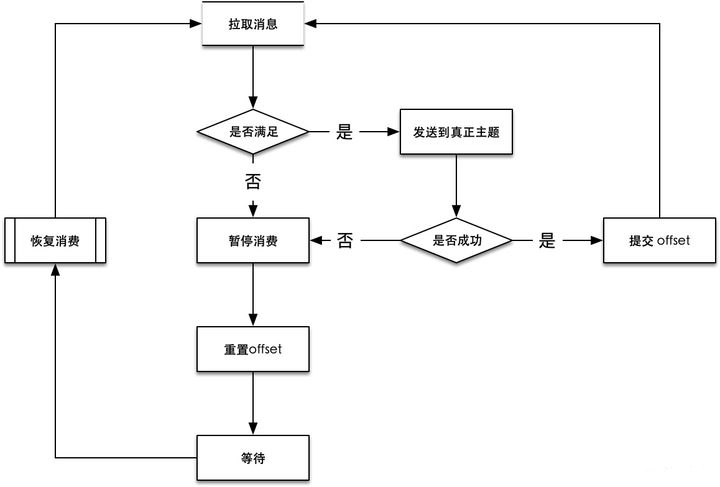 当消费者发现消息不满足条件时,暂停消费者,并将偏移量 seek 到上一次消费的位置,以便等待下一个周期再次消费这条消息。 ### 代码实现 ```java import com.fasterxml.jackson.core.JsonProcessingException; import com.fasterxml.jackson.databind.JsonNode; import com.fasterxml.jackson.databind.ObjectMapper; import org.apache.kafka.clients.consumer.*; import org.apache.kafka.clients.producer.KafkaProducer; import org.apache.kafka.clients.producer.ProducerConfig; import org.apache.kafka.clients.producer.ProducerRecord; import org.apache.kafka.common.TopicPartition; import org.apache.kafka.common.serialization.StringDeserializer; import org.apache.kafka.common.serialization.StringSerializer; import org.junit.jupiter.api.BeforeEach; import org.junit.jupiter.api.Test; import org.springframework.boot.test.context.SpringBootTest; import java.time.Duration; import java.util.*; import java.util.concurrent.ExecutionException; @SpringBootTest public class DelayQueueTest { private KafkaConsumer<String, String> consumer; private KafkaProducer<String, String> producer; private volatile Boolean exit = false; private final Object lock = new Object(); private final String servers = "localhost:9092"; @BeforeEach void initConsumer() { Properties props = new Properties(); props.put(ConsumerConfig.BOOTSTRAP_SERVERS_CONFIG, servers); props.put(ConsumerConfig.GROUP_ID_CONFIG, "d"); props.put(ConsumerConfig.ENABLE_AUTO_COMMIT_CONFIG, "false"); props.put(ConsumerConfig.AUTO_OFFSET_RESET_CONFIG, "earliest"); props.put(ConsumerConfig.ISOLATION_LEVEL_CONFIG, "read_committed"); props.put(ConsumerConfig.MAX_POLL_INTERVAL_MS_CONFIG, "5000"); consumer = new KafkaConsumer<>(props, new StringDeserializer(), new StringDeserializer()); } @BeforeEach void initProducer() { Properties props = new Properties(); props.put(ProducerConfig.BOOTSTRAP_SERVERS_CONFIG, servers); props.put(ProducerConfig.VALUE_SERIALIZER_CLASS_CONFIG, StringSerializer.class.getName()); props.put(ProducerConfig.KEY_SERIALIZER_CLASS_CONFIG, StringSerializer.class.getName()); producer = new KafkaProducer<>(props); } @Test void testDelayQueue() throws JsonProcessingException, InterruptedException { String topic = "delay-minutes-1"; List<String> topics = Collections.singletonList(topic); consumer.subscribe(topics); Timer timer = new Timer(); timer.schedule(new TimerTask() { @Override public void run() { synchronized (lock) { consumer.resume(consumer.paused()); lock.notify(); } } }, 0, 1000); do { synchronized (lock) { ConsumerRecords<String, String> consumerRecords = consumer.poll(Duration.ofMillis(200)); if (consumerRecords.isEmpty()) { lock.wait(); continue; } boolean timed = false; for (ConsumerRecord<String, String> consumerRecord : consumerRecords) { long timestamp = consumerRecord.timestamp(); TopicPartition topicPartition = new TopicPartition(consumerRecord.topic(), consumerRecord.partition()); if (timestamp + 60 * 1000 < System.currentTimeMillis()) { String value = consumerRecord.value(); ObjectMapper objectMapper = new ObjectMapper(); JsonNode jsonNode = objectMapper.readTree(value); JsonNode jsonNodeTopic = jsonNode.get("topic"); String appTopic = null, appKey = null, appValue = null; if (jsonNodeTopic != null) { appTopic = jsonNodeTopic.asText(); } if (appTopic == null) { continue; } JsonNode jsonNodeKey = jsonNode.get("key"); if (jsonNodeKey != null) { appKey = jsonNode.asText(); } JsonNode jsonNodeValue = jsonNode.get("value"); if (jsonNodeValue != null) { appValue = jsonNodeValue.asText(); } // send to application topic ProducerRecord<String, String> producerRecord = new ProducerRecord<>(appTopic, appKey, appValue); try { producer.send(producerRecord).get(); // success. commit message OffsetAndMetadata offsetAndMetadata = new OffsetAndMetadata(consumerRecord.offset() + 1); HashMap<TopicPartition, OffsetAndMetadata> metadataHashMap = new HashMap<>(); metadataHashMap.put(topicPartition, offsetAndMetadata); consumer.commitSync(metadataHashMap); } catch (ExecutionException e) { consumer.pause(Collections.singletonList(topicPartition)); consumer.seek(topicPartition, consumerRecord.offset()); timed = true; break; } } else { consumer.pause(Collections.singletonList(topicPartition)); consumer.seek(topicPartition, consumerRecord.offset()); timed = true; break; } } if (timed) { lock.wait(); } } } while (!exit); } } ``` 这是基于 Spring Boot 2.4.4 和 kafka-client 2.7.0 版本编写的单元测试。启动程序后,向 `delay-minutes-1` 发送如下格式的 JSON 字符串数据: ```json { "topic": "target", "key": "key1", "value": "value1" } ``` 同时启动一个消费者监听 `target` 这个 topic,在一分钟后,将会收到一条 `key="key1", value="value1"` 的数据。 ### 实际项目要完善的地方 - 创建多个 topic 用于处理不同时间的延迟消息,例如 `delay-minutes-1`、`delay-minutes-5`、`delay-minutes-10`、`delay-minutes-15` 以提供不同级别的延迟时间。 - 避免在顺序拉取消息的时候,因为一条消息不满足条件,导致后面的消息全部排队等待。编辑于 2024-05-27 19:37 •IP属地 北京举报评论收藏
你爱你的玫瑰是因为你在你的玫瑰上花了太多的时间!吴敏虽然 Kafka 本身没有内置延迟队列的功能,但可以通过一些技巧来实现延迟消息。以下是通过代码实现 Kafka 延迟消息的方案。 ### 方案概述 Kafka 默认是一个高性能的消息队列,消息发送后会立刻被消费。为了实现延迟发送,需要以下步骤: 1. 发送延迟消息时不直接发送到目标 topic,而是发送到一个用于处理延迟消息的 topic,例如 `delay-minutes-1`。 2. 编写代码从 `delay-minutes-1` 中拉取消息,将满足条件的消息发送到真正的目标 topic。 ### 如何延迟发送 当程序收到消息后,如果条件不满足,可以调用 KafkaConsumer 的暂停方法,然后定期恢复消费来检查消息是否满足条件。 ### 正确的方案 KafkaConsumer 提供了暂停和恢复的 API,可以利用这个特性实现延迟消息。具体流程如下图所示:  当消费者发现消息不满足条件时,暂停消费者,并将偏移量 seek 到上一次消费的位置,以便等待下一个周期再次消费这条消息。 ### 代码实现 ```java import com.fasterxml.jackson.core.JsonProcessingException; import com.fasterxml.jackson.databind.JsonNode; import com.fasterxml.jackson.databind.ObjectMapper; import org.apache.kafka.clients.consumer.*; import org.apache.kafka.clients.producer.KafkaProducer; import org.apache.kafka.clients.producer.ProducerConfig; import org.apache.kafka.clients.producer.ProducerRecord; import org.apache.kafka.common.TopicPartition; import org.apache.kafka.common.serialization.StringDeserializer; import org.apache.kafka.common.serialization.StringSerializer; import org.junit.jupiter.api.BeforeEach; import org.junit.jupiter.api.Test; import org.springframework.boot.test.context.SpringBootTest; import java.time.Duration; import java.util.*; import java.util.concurrent.ExecutionException; @SpringBootTest public class DelayQueueTest { private KafkaConsumer<String, String> consumer; private KafkaProducer<String, String> producer; private volatile Boolean exit = false; private final Object lock = new Object(); private final String servers = "localhost:9092"; @BeforeEach void initConsumer() { Properties props = new Properties(); props.put(ConsumerConfig.BOOTSTRAP_SERVERS_CONFIG, servers); props.put(ConsumerConfig.GROUP_ID_CONFIG, "d"); props.put(ConsumerConfig.ENABLE_AUTO_COMMIT_CONFIG, "false"); props.put(ConsumerConfig.AUTO_OFFSET_RESET_CONFIG, "earliest"); props.put(ConsumerConfig.ISOLATION_LEVEL_CONFIG, "read_committed"); props.put(ConsumerConfig.MAX_POLL_INTERVAL_MS_CONFIG, "5000"); consumer = new KafkaConsumer<>(props, new StringDeserializer(), new StringDeserializer()); } @BeforeEach void initProducer() { Properties props = new Properties(); props.put(ProducerConfig.BOOTSTRAP_SERVERS_CONFIG, servers); props.put(ProducerConfig.VALUE_SERIALIZER_CLASS_CONFIG, StringSerializer.class.getName()); props.put(ProducerConfig.KEY_SERIALIZER_CLASS_CONFIG, StringSerializer.class.getName()); producer = new KafkaProducer<>(props); } @Test void testDelayQueue() throws JsonProcessingException, InterruptedException { String topic = "delay-minutes-1"; List<String> topics = Collections.singletonList(topic); consumer.subscribe(topics); Timer timer = new Timer(); timer.schedule(new TimerTask() { @Override public void run() { synchronized (lock) { consumer.resume(consumer.paused()); lock.notify(); } } }, 0, 1000); do { synchronized (lock) { ConsumerRecords<String, String> consumerRecords = consumer.poll(Duration.ofMillis(200)); if (consumerRecords.isEmpty()) { lock.wait(); continue; } boolean timed = false; for (ConsumerRecord<String, String> consumerRecord : consumerRecords) { long timestamp = consumerRecord.timestamp(); TopicPartition topicPartition = new TopicPartition(consumerRecord.topic(), consumerRecord.partition()); if (timestamp + 60 * 1000 < System.currentTimeMillis()) { String value = consumerRecord.value(); ObjectMapper objectMapper = new ObjectMapper(); JsonNode jsonNode = objectMapper.readTree(value); JsonNode jsonNodeTopic = jsonNode.get("topic"); String appTopic = null, appKey = null, appValue = null; if (jsonNodeTopic != null) { appTopic = jsonNodeTopic.asText(); } if (appTopic == null) { continue; } JsonNode jsonNodeKey = jsonNode.get("key"); if (jsonNodeKey != null) { appKey = jsonNode.asText(); } JsonNode jsonNodeValue = jsonNode.get("value"); if (jsonNodeValue != null) { appValue = jsonNodeValue.asText(); } // send to application topic ProducerRecord<String, String> producerRecord = new ProducerRecord<>(appTopic, appKey, appValue); try { producer.send(producerRecord).get(); // success. commit message OffsetAndMetadata offsetAndMetadata = new OffsetAndMetadata(consumerRecord.offset() + 1); HashMap<TopicPartition, OffsetAndMetadata> metadataHashMap = new HashMap<>(); metadataHashMap.put(topicPartition, offsetAndMetadata); consumer.commitSync(metadataHashMap); } catch (ExecutionException e) { consumer.pause(Collections.singletonList(topicPartition)); consumer.seek(topicPartition, consumerRecord.offset()); timed = true; break; } } else { consumer.pause(Collections.singletonList(topicPartition)); consumer.seek(topicPartition, consumerRecord.offset()); timed = true; break; } } if (timed) { lock.wait(); } } } while (!exit); } } ``` 这是基于 Spring Boot 2.4.4 和 kafka-client 2.7.0 版本编写的单元测试。启动程序后,向 `delay-minutes-1` 发送如下格式的 JSON 字符串数据: ```json { "topic": "target", "key": "key1", "value": "value1" } ``` 同时启动一个消费者监听 `target` 这个 topic,在一分钟后,将会收到一条 `key="key1", value="value1"` 的数据。 ### 实际项目要完善的地方 - 创建多个 topic 用于处理不同时间的延迟消息,例如 `delay-minutes-1`、`delay-minutes-5`、`delay-minutes-10`、`delay-minutes-15` 以提供不同级别的延迟时间。 - 避免在顺序拉取消息的时候,因为一条消息不满足条件,导致后面的消息全部排队等待。编辑于 2024-05-27 19:37 •IP属地 北京举报评论收藏
公众号进入网站体验更佳